


Introduction to zero trust security
Zero trust security is a modern way to protect systems, apps, and data. It works well because today’s work is not limited to one office. People use cloud apps, phones, home Wi‑Fi, and shared tools. Attackers also changed. They do not always break in with loud attacks. They often sign in using stolen passwords. They also move quietly after they enter. Zero trust security treats every access request as risky until it proves it is safe. It does not matter if the user sits inside the office or outside. Zero trust security checks identity, device health, location, and other signals before it allows access. It also keeps checking during the session. This approach reduces trust that lasts forever. Many teams like zero trust security because it matches real life. Networks are now mixed. Data lives in many places. Users work from anywhere. Zero trust security gives a clear rule that fits this world: never trust by default and always verify.
What is zero trust security and why it matters
Zero trust security is a security model that assumes threats can exist anywhere. It can be outside the company, inside the company, or even inside a trusted device. Older security models focused on the network edge. They tried to keep bad actors out with firewalls. They then trusted most activity inside the network. That old idea worked better when apps lived in one data center and people worked on office desktops. It does not work well now because the “inside” is not clear anymore. Cloud apps sit outside the old network. Remote users connect from many locations. Partners and vendors also need access. Zero trust security matters because it removes blind trust. It makes every request prove itself. It also reduces damage when an attacker gets in. Many breaches start with stolen credentials and misuse of authorized accounts. Zero trust security fights this by using strong identity checks, least access, and constant monitoring. It also supports modern work patterns without weakening security. Microsoft describes security approaches that rely on identity and access controls as core parts of protecting modern services and data. Zero trust security fits that direction.

Core principles of zero trust security
Zero trust security follows a few principles that are easy to understand. The first principle is that you verify explicitly. That means you check who the user is and you also check the device they use. You do not accept a password alone as proof. You use strong sign-in methods, and you use context. The second principle is least privilege. That means each person and each system gets only the access they need for their job. They do not get extra access “just in case.” This reduces risk when an account is stolen. The third principle is assume breach. You act like an attacker may already be inside. You plan for it. You monitor for strange behavior. You limit movement between systems. This helps you contain problems fast. These principles sound strict, but they do not need to create pain. When you design it well, zero trust security can feel smooth. Many checks can happen silently in the background. You can also increase checks only when risk is high. This keeps work easy while still keeping data safer. Zero trust security is not one product. It is a set of choices that guide how you design access and security.
How zero trust security works in real life
Zero trust security works by checking identity and context before access. A user tries to open an app. The system checks the user’s identity. It checks if the sign-in looks normal. It checks the device. It checks if the device is patched and encrypted. It checks location and time. It checks the sensitivity of the app and data. If everything looks safe, the system allows access. If risk looks high, the system asks for extra proof such as multi-factor authentication. If risk looks very high, it blocks access. Zero trust security also uses strong session control. It does not treat access as a forever ticket. It can re-check during the session. It can also reduce what the user can do inside an app. Another key part is segmentation. Zero trust security reduces “free movement” inside the environment. If an attacker gets one account, they should not be able to reach everything. Monitoring also matters. Zero trust security collects signals from sign-ins, endpoints, and apps. It looks for unusual behavior. It can trigger alerts or automated actions. This is the practical side of “assume breach.” It helps teams react early instead of late.
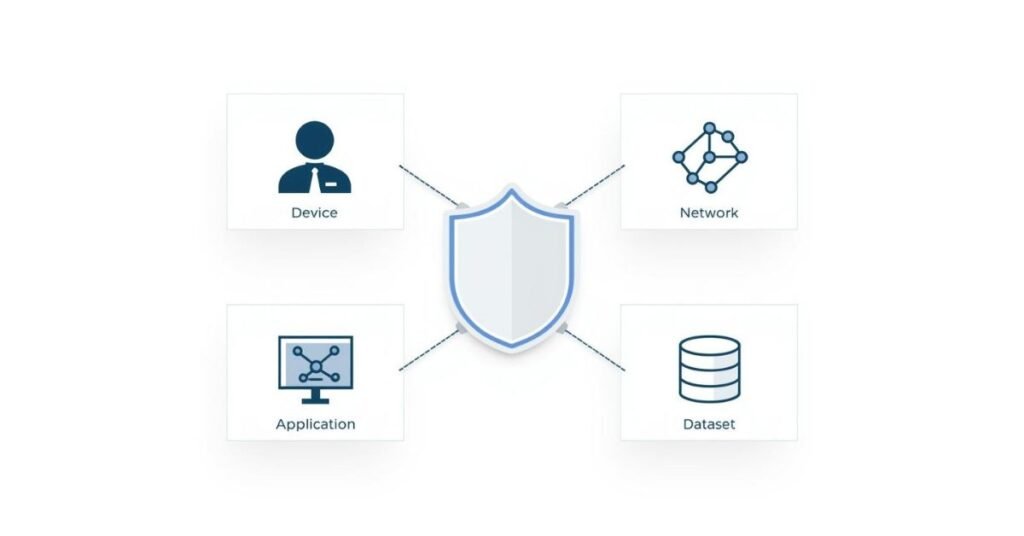
Zero trust security pillars: identity, device, network, app, data
Zero trust security often uses a pillar approach. Each pillar covers a part of the environment. Identity is the first pillar because attackers love stolen credentials. Strong identity controls include multi-factor authentication, modern sign-in, and risk-based checks. Device is another pillar. A trusted user on an unsafe device is still risky. Device checks confirm patch level, encryption, and security tools. Network is a pillar too, but the focus changes. Zero trust security does not rely only on network location. It uses secure connections, segmentation, and policy enforcement close to the resource. Applications form another pillar. You protect each app based on sensitivity, not based on where it sits. Data is also a pillar. Data needs labels, encryption, and controlled sharing. When you build zero trust security, you often improve all pillars step by step. You can start with identity because it gives fast wins. You can then add device compliance. After that, you can tighten access to sensitive apps and data. These pillars also help teams plan work in a logical way. They make the big idea of zero trust security easier to apply in daily decisions.
Table: Zero trust security pillars and what they protect
| Zero trust security pillar | What it protects | Common example controls |
| Identity | Accounts and sign-ins | MFA, conditional access, single sign-on |
| Device | Endpoints and mobiles | Device compliance checks, encryption, patch rules |
| Network | Connections and paths | Segmentation, secure access, traffic inspection |
| Application | Business apps and services | App access policies, API security, app monitoring |
| Data | Files, records, and secrets | Data labels, encryption, access logs |
Zero trust security vs traditional security models
Traditional security often trusts the internal network. It assumes people inside are safe. It also assumes devices on the internal network are safe. This leads to broad access. It also creates large blast radius during attacks. Zero trust security changes the trust model. It does not give trust based on location. It gives trust based on proof. It also focuses on the smallest possible access. This helps limit lateral movement. Another major difference is continuous verification. Traditional models often verify at the start and then stop. Zero trust security keeps checking as risk changes. The difference also shows in monitoring. Zero trust security depends on strong logs and clear signals. It also supports automation. That helps in modern environments where teams cannot manually handle every event. Traditional security can still use many good tools, but it often lacks a consistent access philosophy. Zero trust security gives that philosophy. It helps teams decide what to do when they move to cloud, support remote workers, or open access to partners. The goal is not to throw away every old tool. The goal is to redesign trust so that security matches the way work actually happens.
Benefits of zero trust security for modern organizations
Zero trust security reduces risk in a practical way. It reduces the chance that stolen credentials will lead to a full breach. It does that by requiring stronger sign-in and by limiting access. It also reduces damage when something goes wrong. If an attacker enters one area, segmentation and least privilege slow them down. This gives defenders time to respond. Zero trust security also supports remote work well. It can protect access from any location because it focuses on identity and device state. This helps companies stay flexible without becoming unsafe. Zero trust security also improves visibility. When you build it, you often centralize sign-in logs and access decisions. That makes investigations easier. It can also help with compliance because you can show who accessed data and when. Another benefit is better user experience when done right. Single sign-on and smart policies can reduce repeated password prompts. The user sees fewer friction points in low-risk cases. You can also add friction only when needed. That balance is important. Zero trust security aims to be strict with attackers and smooth for real users.
Common zero trust security technologies you will see
Zero trust security uses a mix of tools. Identity providers support single sign-on and modern authentication. Multi-factor authentication adds a second proof. Conditional access systems check context such as device health or location. Endpoint management tools help confirm device compliance. Endpoint detection tools watch for malware or suspicious actions. Network segmentation tools reduce movement. Secure access services help connect users to apps safely. Data protection tools help label and encrypt data. Logging and analytics tools detect threats and support response. You can also use automation to respond quickly, such as disabling sessions when risk rises. Some companies also use the idea of policy engines. These engines make access decisions based on rules and risk. The exact products differ by company size and budget. The goal stays the same. Zero trust security uses multiple layers so one failure does not cause a full breach. It also keeps access decisions close to the resource. This reduces reliance on old perimeter ideas. It is a practical system design, not a single box you buy.
Zero trust security for cloud and SaaS environments
Zero trust security fits cloud and SaaS very well. Cloud apps already sit outside the old network perimeter. So you need strong access controls. Zero trust security focuses on identity and device, which matches SaaS access patterns. Many SaaS platforms support single sign-on, multi-factor authentication, and access logs. These features help you build zero trust security faster. Conditional access is also common. It lets you set rules like “allow access only from compliant devices” or “ask for MFA when risk is high.” Data protection is also important in SaaS. Files move quickly through chat, email, and shared drives. Without controls, sensitive data can leak. Zero trust security encourages labeling and encryption. It also encourages strict sharing rules. Microsoft’s security and privacy guidance for modern services highlights the role of controls around access and data handling [1]. That aligns with zero trust security goals. Cloud is also dynamic. Systems change often. Zero trust security uses policy and automation, which scales better than manual approvals.
Zero trust security for remote work and BYOD
Remote work increases risk because users connect from many places. Home routers are not managed like office networks. Public Wi‑Fi can also be risky. BYOD adds another challenge. Personal devices may not follow company patch rules. Zero trust security helps because it does not rely on the network being trusted. It checks the user and the device each time. It can also require stronger controls for sensitive apps. For example, a company might allow email on BYOD but block access to finance systems unless the device meets compliance rules. Zero trust security can also use browser-based access or secure app portals to reduce data exposure on unmanaged devices. It can also use session controls to prevent downloads of sensitive files. Another key part is education. Zero trust security works best when employees understand why policies exist. Clear communication reduces frustration. It also improves adoption. When employees see that zero trust security protects them as well, they cooperate more. This matters because human behavior is often the weakest link. Zero trust security reduces reliance on perfect behavior, but training still helps.
How to implement zero trust security step by step
Zero trust security implementation works best as a journey. You do not need to rebuild everything at once. You start by mapping what you have. You identify key apps and data. You identify the most common access paths. You then choose a starting point that gives fast results. Many teams start with identity. They enable multi-factor authentication and single sign-on. They also remove old protocols that are easy to abuse. Next, they improve device visibility. They use endpoint management to understand device health. They then set compliance rules. After that, they tighten access policies for sensitive apps. They apply least privilege. They also review privileged accounts such as admin roles. They then move into segmentation and deeper monitoring. During the whole process, they improve logging and incident response. They also adjust policies based on real user needs. The goal is steady improvement. Zero trust security is not about blocking work. It is about making access safer without slowing business. Strong planning helps. A clear roadmap also helps because it keeps teams aligned. It also helps leaders understand budget and timeline.
Table: A simple roadmap for zero trust security adoption
| Phase | Focus area | What success looks like |
| Foundation | Identity controls | MFA and SSO cover most users and apps |
| Visibility | Devices and logs | You can see device risk and access activity |
| Control | Least privilege | Users have only needed access to key systems |
| Containment | Segmentation | A breach in one area does not spread easily |
| Optimization | Automation and tuning | Policies adjust to risk with minimal friction |
Zero trust security challenges and how to handle them
Zero trust security can feel complex at first. The biggest challenge is legacy systems. Older apps may not support modern authentication. In that case, you can place them behind a secure access layer. You can also prioritize replacing high-risk legacy systems. Another challenge is user friction. Too many prompts can annoy users. You solve this by using risk-based rules. You also use single sign-on to reduce password pain. Device checks can also cause issues if the company has many unmanaged devices. You can handle this by creating different access tiers. Low-risk apps can allow broader access. High-risk apps can require stricter rules. Another challenge is policy sprawl. If rules become messy, teams make mistakes. You solve this by using clear naming, documentation, and regular reviews. Monitoring can also create alert fatigue. You solve this by tuning alerts and focusing on high-value signals. Zero trust security also needs leadership support. Without it, teams may skip hard steps like reducing admin rights. Clear goals and clear communication help overcome these challenges.
Zero trust security best practices that keep it simple
Zero trust security works best when you keep policies clear. You should use one strong identity system and connect apps to it. You should require multi-factor authentication for most access. You should protect admin accounts with extra controls. You should keep device policies clear and realistic. You should not set rules that most devices cannot meet. You should also label sensitive data and restrict sharing. You should log access and review it. You should also test policies before you apply them widely. Pilot groups help you learn without breaking work. You should also revisit permissions often. People change roles, and access should change too. Another best practice is automation. If risk rises, automation can lock down access fast. This reduces response time. You should also build a culture of verification. Zero trust security is not about mistrusting employees. It is about protecting the business from modern threats. When teams see it that way, they support it more. Over time, zero trust security becomes a normal part of how work happens.
Zero trust security use cases you can relate to
Zero trust security becomes easy to understand when you picture daily use cases. A finance employee tries to open payroll data from home. Zero trust security checks identity and device. It allows access only if the device is compliant and the sign-in is low risk. A developer tries to access a production system. Zero trust security requires stronger proof and limits what actions they can take. A vendor tries to access a support portal. Zero trust security gives them limited access to only what they need. A user clicks a phishing link and enters a password. The attacker tries to sign in from a strange location. Zero trust security detects the risk and blocks the sign-in or demands extra proof. Even if the attacker gets in, least privilege limits what they can reach. Segmentation stops easy movement to other systems. Monitoring spots unusual behavior and triggers response. These use cases show why zero trust security is practical. It reduces risk without forcing everyone to work only inside a corporate office network. It matches how modern access really happens.
Measuring success of zero trust security
You can measure zero trust security success using simple signals. You can track how many apps use single sign-on. You can track multi-factor authentication coverage. You can track how many devices meet compliance rules. You can track how many privileged accounts exist and how often they are used. You can track how often policies block risky sign-ins. You can track time to detect and time to respond. You can also track data sharing events and policy violations. The goal is not to chase perfect numbers. The goal is to reduce real risk. You also want to keep user experience acceptable. So you can track user login success rates and support tickets related to access. If tickets spike, you may need to tune policies. You can also review incident reports. If attacks stop earlier in the chain, zero trust security is working. Over time, you should see fewer broad permissions and fewer risky access paths. You should also see improved visibility. When a security event happens, teams should be able to trace it quickly using logs. That is a key sign of maturity.

Conclusion: Why Zero Trust Security Is Worth Adopting Now
Zero trust security is not just a trend. It is a response to real changes in work and real changes in attacks. People work from anywhere. Data lives in the cloud. Apps connect through APIs. Attackers often use stolen credentials. Traditional perimeter thinking cannot keep up. Zero trust security gives a better rule: verify every request and limit access every time. It also assumes breach, which makes systems more resilient. You can adopt zero trust security step by step. You can start with identity, then devices, then sensitive apps, then segmentation and automation. You can also tune policies to avoid unnecessary friction. Over time, zero trust security reduces your attack surface. It improves visibility. It limits damage when something goes wrong. It supports remote work without lowering security. If you want a security approach that fits 2026 reality, zero trust security is a strong choice. It helps you protect people, devices, apps, and data in a world where trust should never be automatic.
FAQs about zero trust security
What does zero trust security mean in simple words?
Zero trust security means you do not trust any user or device by default. You verify every request before you allow access, even inside the network.
Is zero trust security only for large companies?
Zero trust security works for small, medium, and large companies. Smaller teams often start with MFA, single sign-on, and basic device checks to get quick value.
Does zero trust security replace firewalls and antivirus?
Zero trust security does not replace them. It changes the overall design of access. Firewalls and antivirus still help, but zero trust security adds stronger identity checks, least privilege, and continuous verification.
How long does it take to implement zero trust security?
Zero trust security is a journey. You can improve identity security in weeks, but full adoption across apps, devices, and segmentation can take months or longer.
What is the first step to start zero trust security?
The first step is usually identity. You enable multi-factor authentication and connect key apps to single sign-on. This reduces risk fast and supports later zero trust security steps.
Zero Trust Security: The Simple Guide for 2026
Introduction
In an age where cyber-attacks are more advanced and data breaches are all too common, traditional network security models are no longer enough. One of the most discussed solutions in today’s digital world is “Zero Trust Security.” What does it mean? Why is it important? And how does it work in practice? This article explains Zero Trust Security in simple language, including its principles, advantages, challenges, and how organizations can start adopting it.
What Is Zero Trust Security?
Zero Trust Security is a new way of thinking about cybersecurity. Unlike traditional models that assume everything inside a network is safe, Zero Trust assumes that threats can come from both outside and inside the organization. The core belief is: Trust nothing. Always verify everything.
The Traditional Model: “Trust but Verify”
In the past, security focused mainly on building strong perimeters — like firewalls — to keep attackers out. Users and devices inside the perimeter were trusted by default. But as employees work remotely, use mobile devices, and connect through the cloud, the old “castle and moat” model no longer works.
The Zero Trust Model: “Never Trust, Always Verify”
Zero Trust flips the old model. No user or device, inside or outside the network, is automatically trusted. Every access request must be verified, authenticated, and authorized. It treats every attempt to access the network as if it comes from an untrusted source.
The Principles of Zero Trust Security
Zero Trust is built on a few simple but powerful principles:
- Verify Explicitly: Always authenticate and authorize users and devices based on all available data.
- Least Privilege Access: Give users and devices the minimum access they need and nothing more.
- Assume Breach: Always plan as if the network has already been breached. Build systems that limit damage if a breach occurs.
Let’s look at these principles more closely:
1. Verify Explicitly
Do not just trust a single password or say “trusted network = trusted user.” Instead, check:
- User identity
- Device health (Is it up to date? Secure?)
- Location
- Time
- Requested resource
Each login or action is treated as suspicious until proven otherwise through multi-factor authentication, device checks, or context.
2. Least Privilege Access
Employees, devices, and programs should only have access to the data and systems absolutely necessary for their job. No broad permissions. This minimizes risk if credentials are stolen.
3. Assume Breach
Instead of hoping attackers are kept out, design systems with the idea that someone could get in. Monitor continuously for problems so suspicious activity can be caught early. Limit how far an attacker can move within the network (a concept called “micro-segmentation”).
Why Is Zero Trust Important?
The Changing Cybersecurity Landscape
The way people work and the types of threats companies face have changed:
- Employees work from home, hotels, client offices, or coffee shops.
- Cloud services and applications are commonly used.
- Devices include laptops, phones, tablets, and Internet-of-Things (IoT) sensors.
- Hackers use advanced tactics, sometimes impersonating insiders or using stolen credentials.
Traditional network perimeters can’t protect all this. A breach in one part can often move freely across a “trusted” network.
Real-World Threats
According to security research, about 60% of data breaches involve insider threats or misuse of authorized accounts. Many high-profile hacks started with something simple, like a stolen password on a trusted laptop or employee clicking a phishing email. This is why Zero Trust’s focus on constant verification matters.
Key Components of a Zero Trust Architecture
Zero Trust isn’t a single tool. It’s a framework that combines multiple layers of technology and policy:
1. Strong Identity Verification
- Use multi-factor authentication (MFA).
- Constantly validate users’ identities.
2. Device Security
- Test if the device is secure before allowing access.
- Require regular updates and check for malware.
3. Least Privilege & Segmentation
- Use access management tools to set fine-grained permissions.
- Break the network into segments so attackers can’t move easily if they get in.
4. Continuous Monitoring and Analytics
- Use threat detection to monitor activity all the time.
- Analyze behavior for suspicious patterns.
5. Encryption
- Encrypt data in transit and at rest.
- Secure communications between systems.
6. Strong Policies and Automation
- Set clear, automated rules for how data, identities, and devices are managed.
- Automate responses to threats whenever possible.
The Benefits of Zero Trust
Zero Trust is not just a buzzword. It offers real security advantages for organizations of all sizes:
1. Reduces Attack Surface
Because access is tightly controlled and monitored, it’s harder for hackers to roam freely or escalate their attacks.
2. Limits the Impact of Breaches
If an attacker gets access, micro-segmentation and the principle of least privilege help stop them from reaching sensitive systems or data.
3. Supports Remote and Hybrid Work
With employees outside the office and on different networks, Zero Trust’s device- and identity-focused security adapts to any work location or device.
4. Helps Meet Compliance Requirements
Zero Trust architectures help organizations meet strict data privacy laws by controlling who can access what and proving compliance with access logs.
5. Future-Proofs Security
As networks get more complex and attackers get smarter, Zero Trust offers a framework flexible enough to keep up.
Challenges in Adopting Zero Trust
While Zero Trust offers big advantages, it comes with challenges that organizations should plan for:
1. Complexity and Cost
Moving to Zero Trust is not as simple as flipping a switch. It requires time, effort, and investment in new tools and training.
2. Integration With Legacy Systems
Older systems may be harder to adapt to Zero Trust concepts, especially if they were built before remote and cloud-first environments.
3. User Friction
Frequent identity checks or strict access limits can frustrate employees if not implemented thoughtfully. Good design can minimize these issues.
4. Ongoing Maintenance
Zero Trust is not a one-time setup. It needs continuous monitoring, updating of policies, and adapting as the business changes.
How to Start With Zero Trust: Simple Steps
It can feel overwhelming to get started with Zero Trust, especially for small or medium businesses. Here’s a step-by-step approach:
1. Assess Your Current Situation
- Take stock of who accesses what data and with which devices.
- Map out important business systems and their risks.
2. Implement Strong Identities
- Deploy multi-factor authentication everywhere.
- Encourage use of password managers and regular password updates.
3. Secure Devices
- Set up device management to check if a laptop or phone is secure before granting access.
- Require encryption, updates, and anti-malware software.
4. Limit Access
- Review who has access to your most sensitive data. Reduce permissions to the minimum required.
- Break networks into zones or segments.
5. Monitor Everything
- Use security tools to log all access and set up alerts for unusual behavior.
- Review and update policies regularly.
6. Educate Employees
- Explain the “why” behind extra security steps.
- Train everyone on how to recognize phishing and social engineering.
Case Studies: How Companies Use Zero Trust
Large Companies
Many big tech and finance firms use Zero Trust to protect sensitive data when thousands of employees work from anywhere in the world. They combine MFA, device health checks, and micro-segmentation with constant threat monitoring.
Small Businesses
Smaller organizations use cloud-based Zero Trust solutions to secure remote workers and protect themselves against ransomware. For example, requiring MFA for all email and accounting software dramatically reduces risk.
Government
Agencies like the US federal government have adopted Zero Trust as a requirement after large-scale breaches, recognizing it’s essential for national security.
Zero Trust and the Cloud
Cloud services like Microsoft 365, Google Workspace, or Amazon AWS often have built-in features to support Zero Trust such as:
- Conditional Access: Only allow access if the device passes certain security checks.
- Identity Protection: Block suspicious logins automatically.
- Data Encryption: Enforce encryption settings at all times.
Migrating to the cloud is the perfect time to adopt Zero Trust principles.
Common Myths About Zero Trust
Myth 1: Zero Trust Means “Zero Trust of Everyone”
Reality: It means you always verify. It’s not about distrusting your people, but about strong security for everyone.
Myth 2: Zero Trust Requires Getting Rid of Everything Old
Reality: Zero Trust can be implemented gradually. It does not mean throwing away old systems, but protecting them better.
Myth 3: Zero Trust Is Only for Big Companies
Reality: Businesses of all sizes benefit, especially as remote work and cyberthreats impact everyone.
The Future of Zero Trust
Zero Trust is quickly becoming the global standard for cybersecurity. As threats continue to grow and the ways we work become more flexible, only organizations that start adopting Zero Trust principles will be able to keep up.
Expect to see future improvements including:
- More automation in responding to threats
- Even better integration with artificial intelligence (AI) tools
- Greater ease-of-use for both users and IT teams
Conclusion
Zero Trust Security is all about continuous verification, least privilege, and assuming that threats can come from anywhere. By taking a Zero Trust approach, businesses can keep their data safer, support flexible working, and comply with privacy laws. The journey takes time, but the benefits are worth it.
For any organization ready to level up its cybersecurity for the new era — Zero Trust is not just a buzzword. It’s a necessity.
Further Reading & Resources
- Microsoft Learn: Data, Privacy, and Security for Microsoft 365 Copilot
- Kroolo Blog: The Cost of Knowledge Fragmentation and Security
- AI Agent Integration and Zero Trust Patterns
By understanding and adopting Zero Trust Security, your organization can face tomorrow’s cyber threats with confidence.